

970x125
AI startup Perplexity has been hitting a new milestone almost every other week now. The company’s most recent one was making its Comet browser generally available to everyone for free, removing the earlier $200 monthly access restriction.
970x125
Along with the free rollout, the company has also introduced Comet Plus, an optionally paid upgrade — around $5 a month — offering curated news content from media partners. Earlier, Comet was available only to high-tier “Max” users or via invitation. I was one of those early invitees, and so had some time to experiment with the browser.
Though I’m still experimenting and testing different use cases with this tool, one thing is clear — Comet will clearly change the way people will search online. Let me explain how. For nearly three decades, we’ve been used to a search interface that responded with a dozen blue links for a set of input keywords.
Over time, about three of those top links became ads, followed by a Wikipedia link and then news from recognized media sources. Perplexity is upending this model by making the browser a question-and-answer interface — and to some extent a question-answer-action interface.
The shift suggests that Perplexity views Comet as a foundational platform rather than a niche, high-price offering. And now, by giving it to more users, for free, it is making its foundation firm and scalable. The timing and structure signal confidence in scale and usage over margin per user.
A personal assistant
So, how do I use this browser to complete some tasks and automate a few others? The magic is in the assistant button nestled up on the sidebar or in-page tool. You can use this for the most basic AI tasks like summarizing text on a webpage, extracting key points, asking for translation support, comparing multiple sources, and asking questions to get contextually relevant information.
I also used Comet browser to triage my inbox and parse calendar events. For this, I had to set up a widget and allow Comet to connect with my email inbox. I strongly recommend that you set this up with a new ‘professional’ or ‘test’ email address as Perplexity, per its terms of use, stores your data in its server to provide this service. So, it’s best not to use your personal account to test this feature.

Using the connector function, Perplexity scans my inbox and filters emails based on timing and priority, and then suggests actions to be taken. After this, if I pick a specific email, the AI agent drafts a response. The response wasn’t good enough, so I decided against using it and drafted my own. But, I guess it will only be a matter of time before the responses get better as the AI gets more details about my usage and style of the inbox.
Now, because Comet is built on Chromium, users can retain access to extensions and familiar hooks, making adoption easier. Another part of the pitch from Comet is that it can “live” in your browsing, tracing context across tabs, remembering your prior queries, and surfacing insights or assistance at the moment of need. I’m yet to test this feature fully, so I can’t share much about it. But what Comet aims to do with this feature is reduce friction in research, decision making, multitasking, and synthesis while you surf.
Product comparisons and mapping assistant
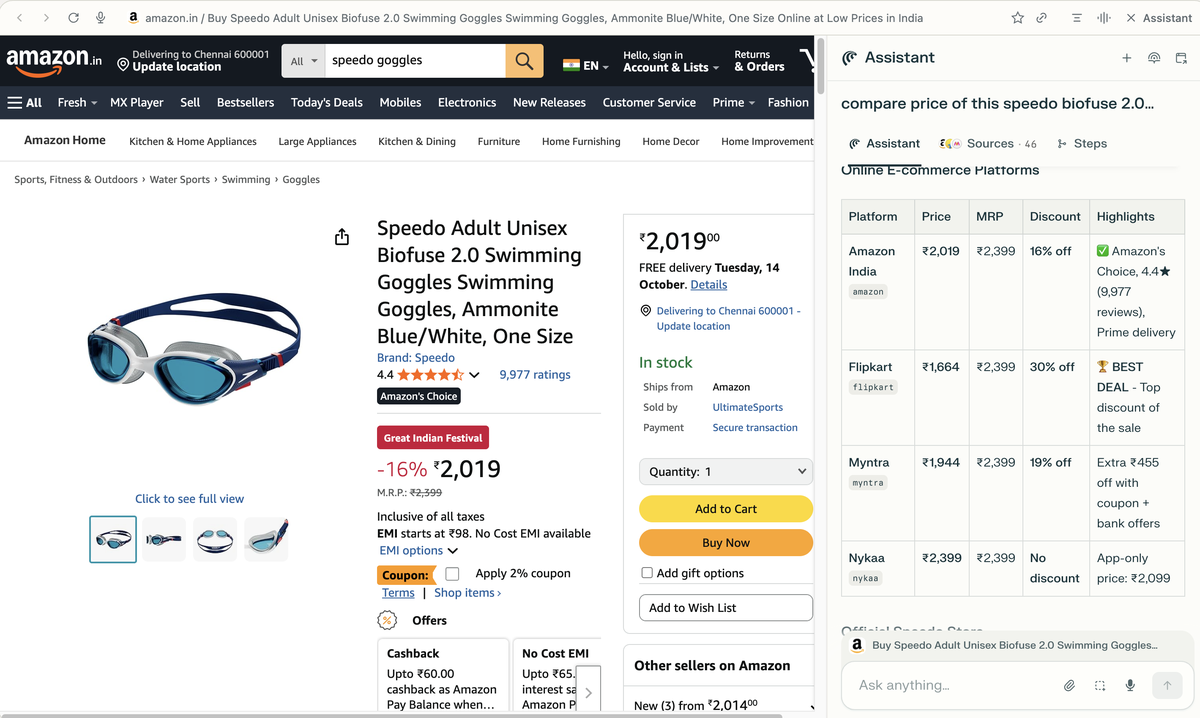
Another interesting area to use Comet is when you want to compare the price of a particular product on multiple e-commerce sites. I tried this when I was searching for a swimming goggles on one e-commerce site. All I had to do was type in a prompt asking the assistant to look for the price of the same product on other platforms and highlight the site where it is available at the lowest selling price. In less than two minutes, Comet Assistant, scoured the web and found a deal that was a grand lesser than what I found in one e-commerce site.
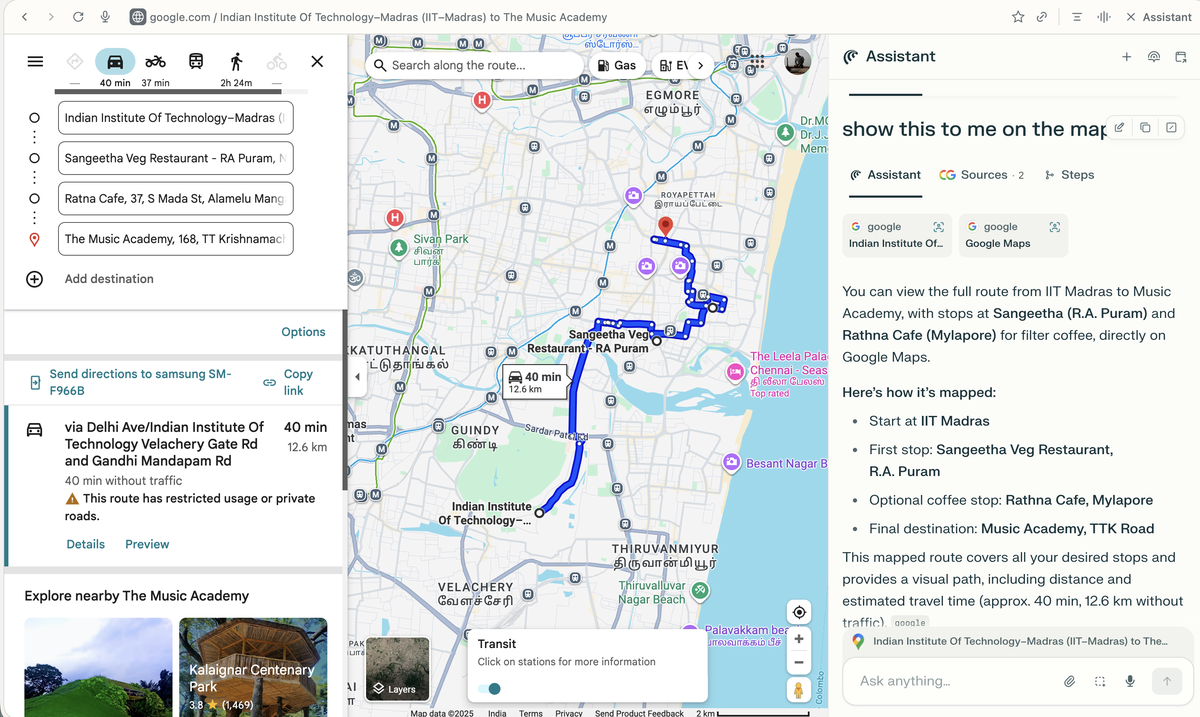
While I’m continuing to test other ways to use this comparison feature, I found Comet to be a great tool to map a route in a new city. For instance, you can ask it to give you the driving directions from point A to point B on Google Maps, and then ask it to include a place to stop for a quick coffee. With that prompt, it will give a step-by-step direction and a few places to stop for a coffee. The real magic happened when I asked it to show how it works on the maps interface I had opened in the Comet browser.

The AI agent quickly started to update the webpage and complete the route planning with options for a coffee break.
These are just some of the use cases I’ve tested, and like I said earlier, there are a lot more to experiment and test. And while all this looks great, one must understand that these tools will also gradually take in all of our data, so I strongly recommend users not to use their personal email accounts or share any personal data with these AI tools.
In short, for an individual user, Comet is meant to be your “agentic browser” — the browser that not only shows you pages but helps you do things with them.
Published – October 07, 2025 08:00 am IST
970x125
